Enterprises
Payments and payouts your finance team can reconcile
Collect from your customers, pay staff, agents and suppliers from the same balance, and export every transaction for your accountants.
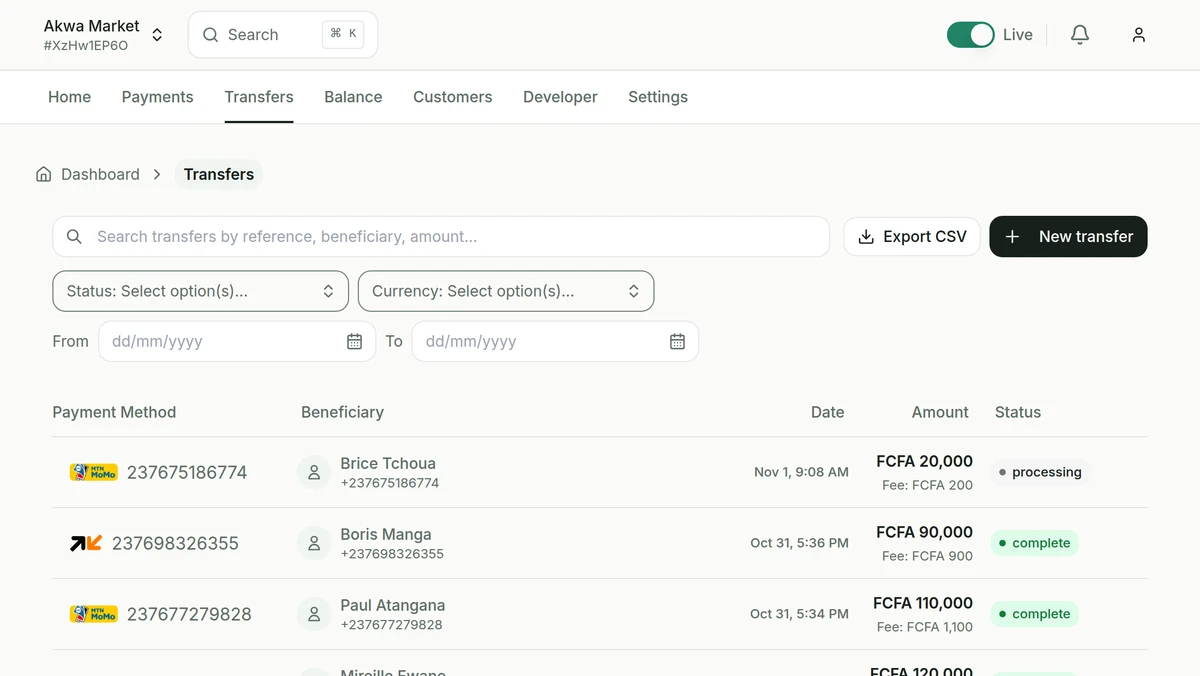
How a payout works
- 01
Add your beneficiaries
Save staff, agents and suppliers once, with their Mobile Money number.
- 02
Send the transfer
Send it from the dashboard, or through the API with your private key from an IP address you have allowed.
- 03
Approve
Above the amount you set, a dashboard transfer waits until a second team member approves it.
- 04
Track and export
Follow each transfer until it arrives, then export the report for your accountants.
Controls for finance teams
- Reporting for finance
- Filter by period or status and export payments and transfers to CSV for reconciliation.
- Access control
- Two-factor authentication, separate API keys and approval rules for transfers.
- Integrate with your systems
- Connect your ERP or internal tools through the API and webhooks.
Talk to us about your volumes.
Create your account and make your first test payment today.
- Test keys as soon as you sign up
- Verification of your business documents
- Live payments, credited to your balance