Transfers
Send money to Mobile Money accounts.
Pay your suppliers and staff from your Notch Pay balance, from the dashboard or the API, and follow each transfer until it arrives.
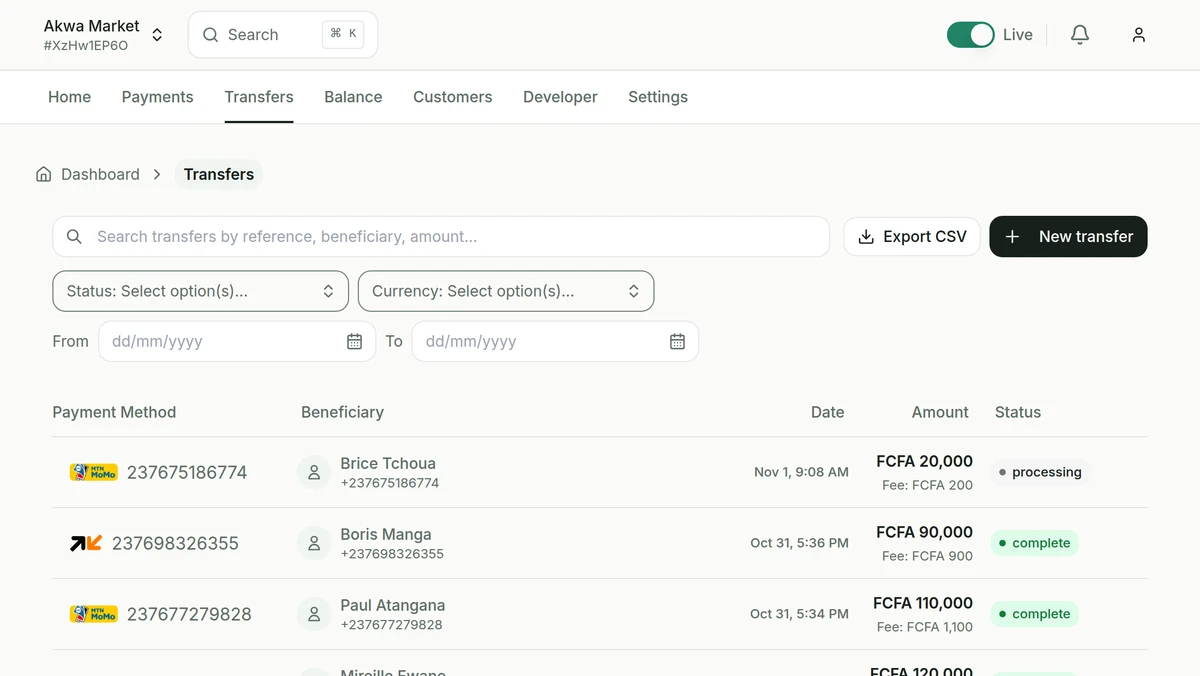
From your balance to their Mobile Money account
Each transfer is tracked from the moment you send it until it reaches the recipient’s account.
- Saved beneficiaries
- Store recipients once and reuse them for every payout, without retyping numbers.
- Status of every transfer
- Follow the status of each transfer and get notified by webhook when it completes.
- Approval above a threshold
- Above an amount you set, a transfer from the dashboard waits until a second team member approves it.
- Failed transfers credited back
- If a transfer fails, everything that was debited goes back to your balance.
Send transfers from your backend.
Save beneficiaries once, then send transfers from your backend. Transfer requests need your private key and, in production, an IP address you have allowed, so only your servers can move money.
curl https://api.notchpay.co/transfers \
  -H "Authorization: $NOTCHPAY_PUBLIC_KEY" \
  -H "X-Grant: $NOTCHPAY_PRIVATE_KEY" \
  -H "Content-Type: application/json" \
  -d '{
    "recipient": "rcp_123456789",
    "amount": 185000,
    "currency": "XAF",
    "description": "November payroll"
  }'
Frequently asked questions
Can’t find what you’re looking for? Talk to our team.
Where can I send money?
Transfers are currently available to MTN Mobile Money and Orange Money accounts in Cameroon. More destinations are on the way.
Can I withdraw to my own account?
Yes. From the dashboard, withdraw your balance to your own Mobile Money account, from 5,000 FCFA.
Send your first transfer.
Create your account and make your first test payment today.
- Test keys as soon as you sign up
- Verification of your business documents
- Live payments, credited to your balance